


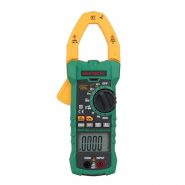
کلمپ آمپرمتر مستک MESTEK CM-83E 600A AC/DC
- True RMS / Auto Power Off
- نمایش هم زمان ۲ پارامتر روی LCD
- مقدار شمارش : 6000 Count
- رنج جریان : 600A AC/DC
- رنج ولتاژ : 600V DC/600V AC
- رنج مقاومت: 60 MΩ
- رنج خازن : 60.000 uF
- رنج اندازه گیری دما : -20 ∼ 1000°C
- مجهز به برق یاب : NCV
- دارای کیف حمل
کلمپ آمپرمتر MESTEK CM-83E 600A AC/DC
کلمپ آمپرمتر MESTEK CM-83E 600A AC/DC
- True RMS / Auto Power Off
- نمایش هم زمان ۲ پارامتر روی LCD
- مقدار شمارش : 6000 Count
- رنج جریان : 600A AC/DC
- رنج ولتاژ : 600V DC/600V AC
- رنج مقاومت: 60 MΩ
- رنج خازن : 60.000 uF
- رنج اندازه گیری دما : -20 ∼ 1000°C
- مجهز به برق یاب : NCV
- دارای کیف حمل
Specifications
Automatic range: Yes Full-range overload protection voltage: 250V The maximum input voltage at COM terminal and INPUT terminal: AC/DC voltage gear 600V Operation altitude: Max. 2000m Display: LCD Maximal display value: 5999 Polarity indication: -Negative electrode Overrange display: OL or -OL Sampling time: About 3 times/second Automatic shutdown: About 10 minutes Power supply: 2xI.5V AAA battery Low battery: LCD display symbol Working temperature: 0°C~40°C Storage temperature: -10°C ~ 50°C Dimension: 200x75x37mm Jaw size: 35mm Weight (excluding battery) : 215g
Symbol description
3.1 description of display symbols
| Symbols | Description |
 |
Battery under-voltage indicator/Low battery charge |
 |
Automatic shutdown function |
 |
Negative electrode |
 |
AC |
 |
DC |
 |
Continuity test |
 |
Diode test |
| NCV | Non-contact AC voltage detection |
| H | Reading hold mode |
| nF/uF/mF | Capacity measurement |
| Ω | Resistance measurement |
| °C/°F | Temperature measurement |
| A | Current measurement |
| Z | Clear the base of DC current gear |
| Hz | Frequency |
| AUTO | Automatic range |
3.2 Description of buttons
SEL/ |
Function selection (short press)/backlight on or off (long press) |
HOLD/ |
Data hold (short press)/flashlight on or off (long press) |
| ZERO | DC |
| NCV | Non-contact AC voltage test |
3.3 Description of input socket
| Input socket | Description |
| COM | The COM terminal is connected with the black probe. |
| INPUT | The INPUT terminal is connected with the red probe. |
Functions
4.1 HOLD and () flashlight: short press to lock the measured data, change the range or short press the HOLD button again to exit the data lock, long press () for 2 seconds to turn the flashlight on or off. 4.2 SEL function switch button: long press () to turn the backlight on or off. 4.3 ZERO reset button: ensure the accuracy of the measured data. Short press the ZERO button under DC current mode to clear the base number caused by the electromagnetic interference in the use environment. 4.4 NCV function: The NCV non-contact AC voltage detection function can be switched by short pressing the NCV button in any gear. 4.5 Automatic shutdown function: If there is no operation for about 10 minutes, the instrument will automatically shut down. Press any button to restart the meter. Press the HOLD button to turn on the meter at the same time, which can cancel the automatic shutdown function and resume the automatic shutdown function after restarting. 4.6 Under-voltage indicator of battery:when () appears on the screen, it means that the battery is low, please replace the battery in time.
Operation guide
5.1 ac voltage
- Turn the rotary switch to the (
 ) gear, and the instrument is at the AC voltage measuring state.
 - The black probe is inserted into the COM terminal and the red probe is inserted into the IN PUT terminal.
- Connect the red and black probes to the line under test for measurement.
5.2 DC voltage
- Rotate the rotary switch to the (
 ) gear, and the instrument is at the DC voltage measurement state.
 - The black probe is inserted into the COM terminal and the red probe is inserted into the INPUT terminal.
- Connect the red and black probes to the line under test for measurement.
5.3 Resistance
- Turn the switch to the (
 ) gear.
 - The default resistance MΩ.
- Connect the red and black probes to the measured resistance.
Notes:
- The measured resistance on the circuit will be different from the actual resistance.
- During maintenance, it is forbidden to measure resistance with live circuit.
- When the instrument is open or the measured resistance is too large, “OL” will be displayed, indicating that the measured value is beyond the measuring range.
5.4 Continuity test
- Turn the rotary switch to the () gear.
- Press SEL key to select () gear.
- Connect the red and black probe to the line under test.
Notes: The resistance value of the tested line is less than about 50Q, the indicating light is always on, and the buzzer makes continuous sounds . 5.5 Diode
- Turn the rotary switch to the () gear.
- Press SEL key to select the () gear.
- Connect the red and black probe to the diode under test.
Notes: When measuring a normal diode, the meter displays the forward voltage drop of the diode under test. 5.6 Capacity
- Turn the rotary switch to the (
 ) gear.
 - Connect the red and black probe to the measured capacity.
Notes:
- When measuring the capacity, it is necessary to discharge the capacity first, and the instrument will charge the capacity during the measurement, and it will take some time for the stable measurement.
5.7 Temperature
- Turn the switch to the (
 ) gear, the instrument automatically measures the current ambient temperature, and press SEL button to convert the temperature to ºF.
 - When measuring the temperature of an object or liquid, insert the red plug of the K thermocouple into the “INPUT” terminal and the black plug into the “COM” terminal, and the thermocouple probe contacts the object to be measured.
5.8 NCV test Short press the NCV button in any gear to switch to NCV non-contact AC voltage test, and press or switch the gear gear again to quit the NCV test.Close the top of the clamp head of the meter to the conductor. The meter judges the measured voltage according to the intensity of the detected voltage signal. For the low voltage the screen displays —-L, for the high voltage,the screen displays —-H, and the indicating light and buzzer give out warnings with different frequencies. Notes:
- Even if there is no indication, the voltage may still exist. Don’t rely on non-contact voltage test to determine whether there is voltage in the wire.
- The test process may be affected by factors such as socket design, different insulation thickness and types.
- External interference sources (such as flashlights, motors, electromagnetism, etc.) may mistakenly trigger non-contact voltage test.
5.9 AC/DC Current measurement
- Set the range switch to A gear, and press SEL button to switch AC and DC current according to the test requirements.
- Open the jaw by holding the trigger, place the single wire of the tested line in the center of the clamp head and the instrument will display the accurate current value when the jaw is completely closed.
Note:
- It is only necessary to clamp a single wire to measure the current, and it is impossible to measure correctly by clamping two wires at the same time.
- The tested wire is at the center of the clamp head.
- Select the corresponding gear according to the measured current, and the maximum measured AC/DC current is 600A.
- Ensure the accuracy of the measurement data. Press ZERO button shortly under DC current mode to clear the base of DC current caused by electromagnetic interference in the use environment.
Technical indicators
6.1 DC voltage
| Range | Resolution | Accuracy |
| 600mV | 0.001V | ± (0.5% reading +3 digits) |
| 6V | 0.01V | |
| 60V | 0.1V | |
| 600V | 0.1V |
Input impedance: 10MQ; The maximum input voltage: 600V 6.2 AC voltage
| Range | Resolution | Accuracy |
| 6V | 0.01V | ± (0.8% reading +5digits) |
| 60V | 0.1V | |
| 600V | 0.1V |
Input impedance: 10MQ The maximum input voltage: 600V/Frequency response: 40Hz-1KHz 6.3 Resistance
| Range | Resolution | Accuracy |
| 6000 | 0.001kΩ | ±(1.0% reading + 3digits) |
| 6k0 | 0.001kΩ | |
| 60K0 | 0.01kΩ | |
| 600K0 | 0.001MΩ | |
| 6M0 | 0.01MΩ | |
| 60M0 | 0.01 MΩ | ±(2.0% reading + 5digits) |
Overload protection: 250V /open circuit voltage: 1.2V 6.4 Diode
| Function | Range | Resolution | Test condition |
| Diode test |
0.15V-2.5V | 0.001V | Forward DC current: about 1mA; Open circuit voltage: about 2.5V The approximate value of diode forward voltage drop |
Overload protection: 250V 6.5 Continuity test
| Function | Range | Resolution | Description | Test condition |
|
600Ω | 1Ω | When the resistance is less than 300, the buzzer sounds. | Open circuit voltage: about 1V |
Overload protection: 250V 6.6 Capacity
| Range | Resolution | Accuracy |
| 600nF | 0.1nF | ± (4%reading+10digits) |
| 6uF | 0.001uF | |
| 60uF | 0.01uF | |
| 600uF | 0.1uF | |
| 6mF | 0.001mF | |
| 60mF | 0.01mF |
Overload protection: 250V 6.7 AC current
| Range | Resolution | Accuracy |
| 60A | 0.01A | ± (3.0% reading + 10digits) |
| 600A | 0.1A |
Maximum input current: 600A frequency range: 40Hz ~ 400Hz 6.8 DC current
| Range | Resolution | Accuracy |
| 60A | 0.01A | ± (3.0% reading + 10digits) |
| 600A | 0.1A |
Maximum input current: 600A 6.9 Temperature
| Range | Resolution | Accuracy |
| -20 ∼ 1000°C | 1°C | ± (2.0% reading + 2 digits) |
| -4 ∼ 1832°F | 1°F | ± (2.0% reading + 4 digits) |
Overload protection: 250V
Battery replacement
 In order to avoid electric shock or personal injury caused by wrong readings, the instrument display appears ““, replace the battery immediately. Before opening the battery cover and replacing the new battery, shut down and check that the test pen has been disconnected from the measured circuit.
- Turn off the power supply.
- Pull the test probe out of the tested circuit.
- Unscrew the screws fixing the battery cover with a screwdriver.
- Remove the battery cover.
- Remove the old battery.
- Replace with new 2 x 1.5V AAA batteries.
- Install the battery cover and tighten the screws.
Accessories
| 1. Clamp meter | One |
| 2. Instruction manual | One |
| 3. Test pen | A pair |
| 4. 1.5×2 AAA battery | Two |
| 5. Thermocouple | One |
| 6. Storage bag | One |
| سایر مشخصات | ||
|---|---|---|
| ||
برای ثبت دیدگاه، لازم است ابتدا وارد حساب کاربری خود شوید. اگر این محصول را قبلا از این فروشگاه خریده باشید، دیدگاه شما به عنوان مالک محصول ثبت خواهد شد.
هنوز پرسشی ثبت نشده است.
ثبت پرسش جدید
برای ثبت پرسش، لازم است ابتدا وارد حساب کاربری خود شوید
به این پرسش پاسخ دهید
برای ثبت پرسش، لازم است ابتدا وارد حساب کاربری خود شوید




دیدگاهها0
هیچ دیدگاهی برای این محصول نوشته نشده است.